12 posts tagged with "Changelog"

View All Tags

AWS S3 now supported as a Storage Destination!

· 2 min read
Shiv Shankar
Director, PettiCloud

Hello everyone,

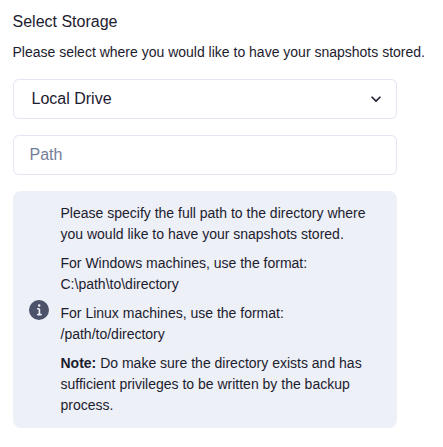
This release brings one of our most requested features: Bring Your Own Storage (BYOS) for AWS S3. You can now store your backups in your own AWS account while continuing to use PettiCloud for automated backup management and monitoring.

What's new

  • Bring Your Own Storage (BYOS) for AWS S3

    • Store backups directly in your own AWS S3 bucket while retaining PettiCloud's automation and management capabilities.
  • Smarter backup monitoring

    • Increased the backup status monitoring threshold to 5 minutes to reduce unnecessary alert emails caused by short-lived network or infrastructure interruptions.
  • Improved reliability

    • Added a watchdog that automatically restarts the agent in rare situations where it unexpectedly stops due to low memory or insufficient disk space.
  • Agent reinstall option

    • You can now reinstall an existing agent directly when needed, making recovery and troubleshooting much simpler.
  • Agent storage validation

    • The agent now validates storage configuration before backup operations, helping detect issues earlier.
  • More readable snapshot file names

    • Snapshot filenames are now easier to understand and identify during manual inspection.

As always, thank you for your feedback. Many of these improvements came directly from customer conversations, and we'll continue focusing on making backup and recovery as reliable and effortless as possible.

Have a great day!

Added 🇪🇺 European Region for Backup Storage

· One min read
Shiv Shankar
Director, PettiCloud

Happy to update that we officially support the European region for storing backups. This should be a great saviour for servers located in Europe to be compliant with GDPR norms and enjoy faster upload speeds. We'd be leveraging AWS's Frankfurt data centers for storing the encrypted backup data. Selection is pretty seamless, like always. All you need to do is select Frankfurt during the selection of the data center in the user interface to set your backup destination to Europe.

Have a great day!!

Windows Backup available now!

· One min read
Shiv Shankar
Director, PettiCloud

It's been a while since we made a massive update. As of today, April 6, 2025 - I'm happy to announce that Windows Backup is officially supported on Petti. This means you can now take automated backups of folders on your Windows PCs & Servers.

Integration is quick! Takes < 2 minutes

Integration will require the Petti's agent to be set up on the target machine. After this, necessary backup jobs have to be created for every folder that needs to be backed up. After this, automated snapshots of the specified folders will commence immediately. Best part is - All of this journey will take less than 2 minutes via our new PowerShell-based installer.

Have a great day!!

PettiCloud.com is our new domain

· One min read
Shiv Shankar
Director, PettiCloud

Our domain has been officially changed to petticloud.com. This change is part of our ongoing efforts to improve our brand and make it easier for our users to find us.

All existing links will be redirected to the new domain.

We support PayPal now!

· One min read
Shiv Shankar
Director, PettiCloud

Hello,

Exciting news! We've made some awesome updates to our platform:

  • PayPal Integration: You can now subscribe hassle-free with PayPal.
  • Dashboard Enhancements: Get ready for deeper insights with user stats on our dashboard.
  • Technical Fixes: We've ironed out issues with telemetry logging, log scheduling delays, and infinite timeouts during snapshot processing.

These improvements reflect our commitment to providing a smoother, more reliable experience for you. Thanks for being part of our journey!

Differential & Transaction Log Backups are live

· 2 min read
Shiv Shankar
Director, PettiCloud

Happy morning Kings,

I am delighted to announce that we officially support differential & transaction log backups. These backups are incremental and can be used to restore the database to a specific point in time.

To integrate, you need no changes on your end. Just modify the backup schedule to your preference from the dashboard. Our client sets your database to full recovery mode and automatically takes a full backup on the first run to ensure consistent LSNs.

Other changes include:

  • Support combined scheduling of full, differential, & transaction log backups.
  • Downloaded snapshots now has different file extension based on the backup type.
    • Full .bak
    • Differential .diff
    • Transaction Log .trn
  • Dashboard & SD now display the backup type of the snapshot.
  • Backup Client now backs off for an hour if the job step fails 5 times in a row to avoid exceeding API rate limits.
  • Improved telemetry to troubleshoot backup client issues.
  • Improved crypto speeds.
    • ~53% faster AES 256 encryption & decryption
    • ~40% faster SHA-256 checksum calculation
  • Snapshot Downloader (SD):
    • Migrated to file size based verification for faster integrity checks.
    • Minimized UI overflow glitch when snapshots get added to download list.

Majority of the feature recommendations are from our users, as seen in Roadmap. We are grateful for your feedback and support. As always, we love our users and are committed to making Petti the best backup solution for your business.

1 TB Database Support, Snapshot Downloader, and more

· One min read
Shiv Shankar
Director, PettiCloud

Vanakkam 🙏,

I am happy to announce that we officially support snapshot sizes up to 1 TB (976 Gib), overcoming our prior support of 5 GB databases. To manage large databases effectively, we are introducing a new Windows application - Snapshot Downloader (SD).

SD is an essential tool for downloading large backups directly on-premise infrastructure. It supports features like parallel downloading, intelligent resuming, fast decryption, and more. All download speeds get amplified by downloading via multiple socket streams.

More on SD will be uncovered in the coming weeks. For now, you can download the latest version from the downloads page.

Other notable changes include:

  • Downloaded snapshots name now represent backup type & timestamp for better identification.
    • Old Naming: Db_x.bak
    • New Naming: Db_Full_2023-12-06_12-00-00.123__x.bak
  • Petti Client: Migrate to a job-based backup mechanism for superior robustness. The client will now keep the necessary data on the drive until each step of the job is executed successfully. It also eliminates issues caused by disk crashes & poor bandwidth.
  • Improve snapshot download speeds on the browser.

Petti 2.0.0 Release Highlights

· One min read
Shiv Shankar
Director, PettiCloud

Vanakkam 🙏,

I am excited to announce that Petti 2.0.0 is up! We have implemented the previously requested features in this release because we love to serve our kings A.K.A customers.

  • Support multiple database backups under a single integration: You no longer have to create separate integrations for each database. Now, all of them sit under one roof (integration) making it very easy to manage all db backups.
  • Set backup frequency (Daily, 15 minutes, 30 minutes, Hourly, 2 hours, 4 hours, 6 hours, 8 hours, 12 hours). Frequency change will reflect in less than 2 minutes on the backup agent.
  • Added email alerts for critical updates such as
    • when snapshot fails
    • when the backup agent goes offline
    • when the backup agent comes online
  • Dashboard UI/UX Updates
    • Filter snapshots by database name
    • Allow backup name editing
    • More info on backup
      • Display SQL Server Backup Strategy [ex: Full backup (Copy Only)]
      • Display no. of snapshots
    • More info on snapshot
      • Display database name
      • Display time of snapshot
  • Petti's Windows Client now displays a "Server Not Reachable" warning when the agent is connected but cannot communicate with the backend. Notifying this to our support will speed up in troubleshooting errors.

Happy Tuesday.

Best, Shiv.